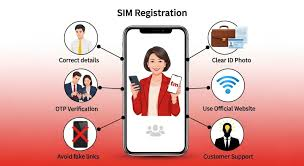
TM SIM Registration Online is a mandatory requirement for all Touch Mobile (TM) prepaid subscribers in the Philippines. TM, operated by Globe Telecom, is widely used for its affordable call, text, and mobile data packages. Under the SIM Registration Act (Republic Act No. 11934), all mobile users must register their SIM cards to continue using telecom services legally.
This detailed guide explains everything you need to know about TM SIM registration, including eligibility, required documents, step-by-step registration process, security tips, common errors, and what happens if you fail to register.
What Is TM SIM Registration and Why It Matters
TM SIM registration is the process of verifying a mobile user’s identity by linking a TM mobile number to personal information and a valid government-issued ID. This system was introduced to help:
- Reduce text scams, phishing links, and fake calls
- Prevent the misuse of anonymous SIM cards
- Improve public safety and digital accountability
- Protect legitimate mobile users
Once registered, your TM SIM becomes legally recognized and protected under Philippine law.
Who Must Register TM SIM Online?
TM SIM registration applies to all prepaid users, including:
- Existing TM subscribers
- New TM SIM card buyers
- Filipino citizens
- Foreign nationals and tourists using TM SIM
Postpaid TM users are generally registered automatically by Globe, but prepaid users must complete registration manually.
Documents and Requirements for TM SIM Registration
Before starting the registration process, make sure you have the following:
1. Active TM SIM Card
Your TM SIM must be inserted in your phone and capable of receiving SMS for OTP verification.
2. Valid Government-Issued ID
Any one of the following IDs is accepted:
- Philippine National ID (PhilSys)
- Passport
- Driver’s License
- UMID
- PRC ID
- SSS / GSIS ID
- Voter’s ID
- Senior Citizen ID
3. Live Selfie Photo
A real-time selfie is required to verify that the SIM owner matches the ID.
4. Internet Connection
A stable internet connection ensures smooth form submission without errors.
Step-by-Step TM SIM Registration Online Process
Step 1: Access the Official Registration Portal
Using your mobile phone or computer, visit the official Globe or TM SIM registration website.
⚠️ Always verify the website URL to avoid fake registration portals.
Step 2: Enter TM Mobile Number
Type your TM SIM number correctly and click Register.
Step 3: OTP Verification
An OTP will be sent via SMS to your TM number. Enter it within the given time limit.
Step 4: Provide Personal Information
Fill in all required fields carefully:
- Full name (as shown on ID)
- Date of birth
- Complete residential address
- Nationality
Incorrect information may result in registration failure.
Step 5: Upload Valid ID Image
Upload a clear photo of your chosen ID. Ensure:
- The photo is not blurred
- All text is readable
- No shadows or glare appear
Step 6: Take a Live Selfie
Follow the on-screen instructions to take a selfie. This confirms your identity.
Step 7: Review and Submit the Form
Check all entered details carefully before submitting.
Step 8: Receive Registration Confirmation
Once approved, you will receive an SMS confirming that your TM SIM is successfully registered.
TM SIM Registration for Foreign Nationals
Foreign users can register TM SIM online by providing:
- Passport
- Proof of address (hotel booking or residence)
- Valid visa or entry stamp
Foreign SIM cards may have limited validity based on visa duration.
What Happens If You Fail to Register TM SIM?
Unregistered TM SIM cards may face:
- Temporary service suspension
- Blocked calls, texts, and mobile data
- Permanent SIM deactivation
Once deactivated, the SIM card cannot usually be recovered.
Common TM SIM Registration Errors and Solutions
OTP Not Received
- Ensure strong network signal
- Request OTP again after a short wait
- Restart your phone
ID Upload Rejected
- Use bright lighting
- Avoid reflections or shadows
- Upload correct file formats
Website Not Responding
- Clear browser cache
- Try a different browser
- Register during off-peak hours
Is TM SIM Registration Safe and Secure?
Yes, TM SIM registration is secure when done through official Globe or TM portals. Globe Telecom follows strict data protection policies under the Philippine Data Privacy Act.
Safety Tips:
- Never share OTP codes
- Avoid third-party SIM registration apps
- Do not upload IDs on unverified websites
Frequently Asked Questions (FAQs)
Is TM SIM registration free?
Yes, registration is completely free.
Can one ID be used for multiple TM SIMs?
Yes, you can register multiple SIM cards using the same ID.
How long does the registration process take?
Usually 5–10 minutes if all documents are ready.
Can I register TM SIM using someone else’s ID?
No, the SIM must be registered under the actual user’s identity.
Final Thoughts
TM SIM Registration Online is a legal requirement and an important step in keeping your mobile services active and secure. By registering early and using official portals, you avoid service disruption and protect yourself from SIM-related fraud.
Make sure your information is accurate, your ID is clear, and your registration is completed on time. Once registered, your TM SIM will remain active, secure, and fully functional.